
What is a 3D product configurator?
CGI Visualization to Perfection
Danthree Studio turns complex 3D tech into high-converting marketing assets. Get high-end quality for your brand.
Discuss your projectWhat is a 3D product configurator?
Definition: 3D Product Configurator
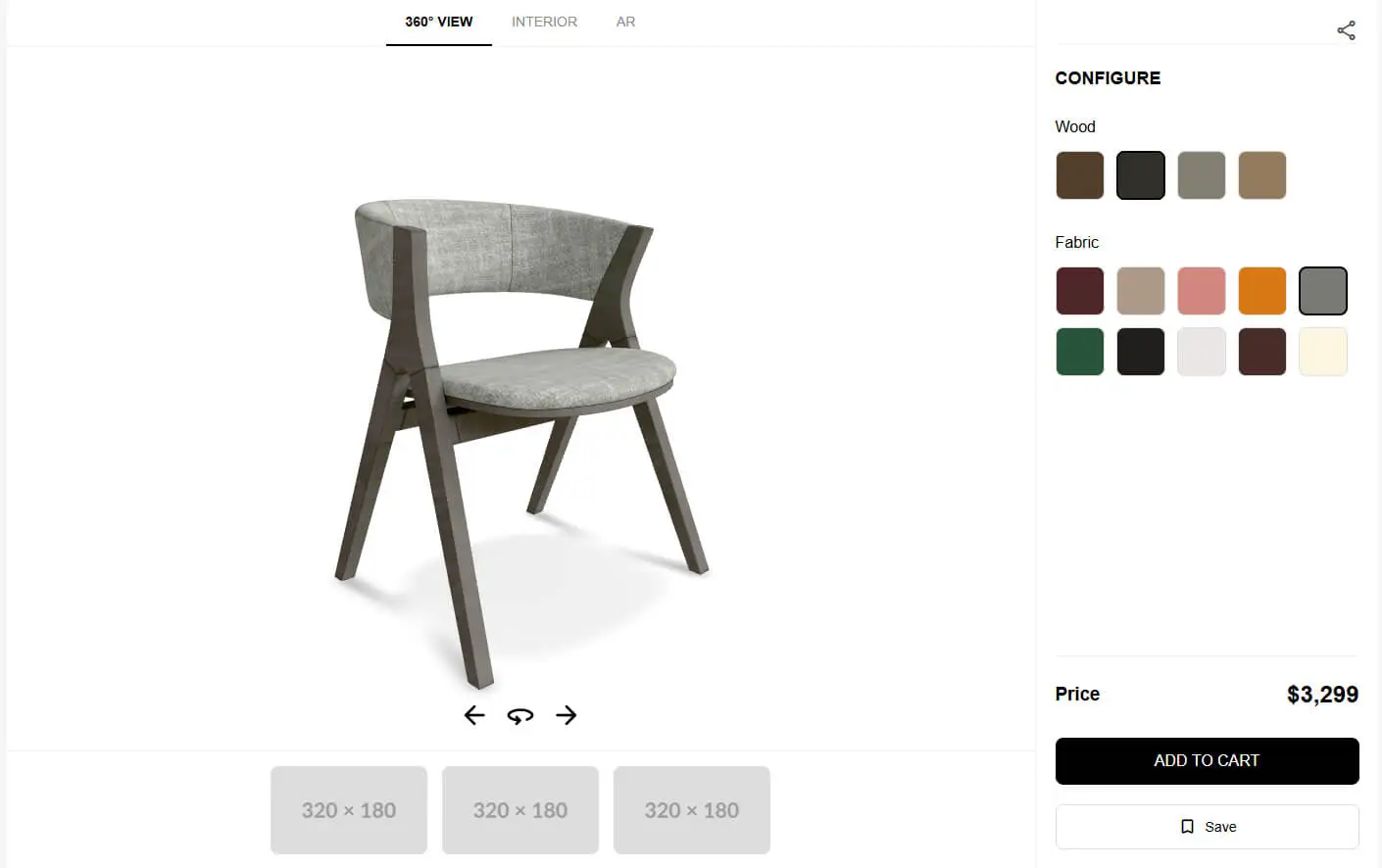
A 3D product configurator connects a product view to selectable options. You can change the color, material or features and see the corresponding version. Depending on the implementation, the views are rendered in real time or assembled from pre-rendered images. An AR preview is an additional feature, not part of every configurator.
Rotating and zooming view of a chair in a product configurator.
What functions does a 3D configurator perform?
| Task | Value and limits |
|---|---|
| Personalization | Compare materials, colors, and features side by side. The available options are determined by the product data and configuration rules. |
| Support the purchasing decision | Present the options clearly. Whether this results in more inquiries or purchases must be measured for each individual store. |
| Clarify Expectations | Show shape, proportions and features. Screen color, material feel and AR placement accuracy have limits. |
| Reuse Materials | A coordinated PBR material library can support several channels. The assets still need preparation and testing in each target system. |
| Sales and Showroom | Make options available during consultations or in a virtual showroom. This does not automatically replace samples or trade shows. |

From Technical Term to Visual Experience
We don't just use these technologies; we master them. See how we create photorealistic worlds for leading brands.
View WorkTechnical Fundamentals
- Renderer and application: Browser rendering, standalone applications, and server-side streaming are different architectures.
- Asset Format: glTF/GLB is a widely used export format for PBR materials. Supported extensions and texture channels must be compatible with the target renderer.
- Shop Interface: Product data, availability, and the shopping cart are integrated via the existing systems. An engine does not automatically provide this business logic.
- AR Viewing: Apple Quick Look and Google Scene Viewer have different requirements for files, devices, and integration.
Six Decisions Before Implementation
- Agree on a loading budget
Plan the startup view, textures, and geometry based on the target devices. Draco compresses geometry but requires additional decoding during loading. - Load options when needed
Load the required materials on demand and show a clear loading state. Test changes on slow connections too. - Instancing Repeated Geometry Effectively
Instancing can reduce the number of draw calls. The benefits depend on the geometry, material, and renderer and must be measured. - Make the configuration shareable
A state URL or a QR code can be used to revisit the selection. Use stable variant identifiers and check what happens when products are no longer available. - Explain the controls
A short instruction for rotating the product or selecting materials helps people get started. Test with users who have not seen the configurator before. - Measure results carefully
Define meaningful events, such as selecting an option or making an inquiry. Account for required consent. A change in revenue at the same time does not establish that the configurator caused it.
Pre-rendered views or real-time rendering?
An image-based configurator switches between prepared renders or combines image layers. A real-time configurator calculates the view from 3D models, materials and lighting. Pixel Streaming moves that calculation to a server. The choice depends on viewpoints, product options, image quality and your audience’s devices.
| Criterion | Pre-rendered | Real-time (WebGL / Pixel Streaming) |
|---|---|---|
| Initial effort | Prepare renderings or image layers for the planned combinations | Develop 3D assets, the material system, variant rules, and the application |
| Runtime Performance | Switching images can require little processing; file volume and loading still matter | Local GPU or streaming infrastructure, depending on the architecture |
| Number of variants | Image requirements grow with options and viewpoints; layering can limit the total | Dynamically combining variants; rules, memory, and computing power set limits |
| Memory Requirements | Depending on the number, resolution, and compression of the images | Models, textures, and application; in addition, ongoing server operations during streaming |
| Interactivity | Linked to the predefined views and transitions | Free camera movement within the intended controls and model quality |
| Update | Render and check the affected images or layers again | Change assets, materials, or rules, and then test again |
| Suitable uses | Fixed views and a manageable selection or one that can be easily divided into layers | Free product viewing, many interchangeable components or more complex interaction |
A Comparison of Technical Approaches
The table shows different building blocks, not interchangeable turnkey solutions. Work with your development team to define the target system before preparing models and materials for delivery.
| # | Platform | Visualization | Integration | AR/VR | Operation | Clarify in advance |
|---|---|---|---|---|---|---|
| 1 | Unreal Engine with Pixel Streaming | Server-side rendered real-time scene | Develop the application and store interfaces for the project | AR/VR Is Not Automatically Included in the Browser Stream | GPU Servers and Streaming Infrastructure | Simultaneous Sessions and Network Connection |
| 2 | Unity | Real-time application for selected target platforms | Implement Interfaces and Product Rules | Depending on the platform, packages, and implementation | Selected Deployment and Current License Terms | Target Devices and Platform Scope |
| 3 | Three.js | 3D rendering in the browser | Develop your own store integration and configuration logic | Device- and browser-dependent WebXR integration | Web hosting and your own application | Loading Behavior and Mobile Display |
| 4 | Threekit | Platform for Visual Product Configuration | Check integrations against systems and project scope | Check AR features for the product and integration | Contracted platform service | Rules, Interfaces, and Ongoing Effort |
| 5 | <model-viewer> | Web component for displaying 3D models | Not a complete e-commerce or CPQ solution | AR through supported modes and devices | Integrated into your own website | Additional configuration features to develop |
Check the current features and terms directly with the respective provider. A viewer alone is no substitute for configuration logic.
Epic: Pixel Streaming · Three.js · Threekit · model-viewer
Switch between wood and fabric options for a chair in a product configurator.
From product data to a configurator
- Set goals & KPIs
- Agree on the purpose, target audience, and measurable project goals.
- Data audit & 3D asset preparation
- Check the geometry, available drawings, and the requirements of the target system.
- Review material references; plan scanning or reconstruction as needed.
- Look development and interface prototype
- Compare the color and material representations with the product references.
- Define the controls and permitted options with the development team.
- Test a prototype using representative products and materials.
- Engine set-up & performance tuning
- Adapt geometry, texture sizes and loading to the target devices.
- Check the material channels and lighting in the actual renderer.
- E-commerce Integration
- Integrate product identifiers, rules, availability, and the shopping cart into the system.
- Integrate AR only if necessary, and verify compatibility with supported devices.
- QA & beta launch
- Test browsers, target devices, loading behavior, and user interaction. TTI has been removed from Lighthouse; select loading and interaction metrics appropriate for the application.
- Test the user experience with representative users and address any obvious obstacles.
- Delivery and showroom integration
- Agree on the integration, responsibilities, and maintenance of product data.
- Plan for changes, additional product lines and possible presentation channels.
A brand environment and a product configurator serve different purposes. Our Interactive Brand Space project demonstrates a spatial presentation. Connecting it to product configuration requires separate planning.
Pixel Streaming and Local Browser Rendering
| Criterion | Pixel Streaming | Local Browser Rendering |
|---|---|---|
| Graphics Quality | Image quality depends on the scene, server capacity and video compression | Image quality depends on the assets, the renderer, and the device |
| Hardware Requirements | Video decoding and a stable internet connection are required | The device calculates the 3D view |
| Data Transmission | Continuous video stream; requirements depend on resolution, frame rate, and compression | Load models, textures, and program code; load additional data depending on the interaction |
| Interaction Latency | Network path, server, and video decoding affect responsiveness | Local calculation; data requests and loading can introduce delays |
| Delivery of the 3D Data | The rendered view is transmitted; with this approach, the geometry remains on the server | Assets required for local rendering are transferred to the browser |
| Scaling | Planning Server Capacity, Session Model, and Costs | Consider File Delivery, End Devices, and Interfaces Together |
| Typical Use Cases | Complex scenes that are to be rendered centrally | Product views on the web, with optional AR enhancements |
What Danthree Provides in a Configurator Project
A convincing configuration starts with traceable product data. Shapes, surfaces and features need to match the manufacturer’s references. The application also needs rules that define which combinations are available.
Our focus is on the visual foundation:
3D models from product references. We prepare geometry using your CAD data, drawings or photographs. We align detail, topology and deliverables with the agreed target system.
Material library. We create digital materials for surfaces such as fabric, wood and metal, checking their appearance against your references.
Visual options. Models, materials and features are assigned to the agreed product options. You provide the permitted combinations; the application’s configuration logic enforces them.
Coordinated delivery. File formats and material scope depend on the application. We agree with the development team whether glTF, GLB, USDZ or other data is required.
Your development team or provider supplies the engine, store integration and hosting. We coordinate the 3D assets with them and check the agreed visual result. A change of system may require additional adjustments.
A well-maintained model and material library facilitates further applications. However, for other renderers, AR, or print, separate adaptations and checks may be required.
Tell us about your product, the desired variants, and the target system. We'll discuss which models and materials you'll need for this.
Existing CAD data, drawings and material references help us assess the work.
Let's talkFAQ: 3D Product Configurator
How does a 3D configurator differ from an option dropdown?
An option dropdown selects a product record. A 3D configurator connects that selection to a spatial product view. Available rotation, zoom and AR features depend on the implementation.
Which engine is best for furniture configurators?
There is no universally best engine. Image quality, devices, product logic, store integration and operation need to work together. A prototype using your actual materials is more informative than a generic vendor example.
Can I reuse the configurator in AR or a showroom?
Models and materials can often be reused. File formats, material features, scale, memory requirements and the selected configuration must be checked in the target system and adjusted where necessary.
How do I measure ROI?
Compare development effort and ongoing costs with observed results. Useful measures include qualified inquiries, configurator use and purchases. A controlled comparison helps distinguish the configurator’s contribution from other store changes.
What data do I need to start?
CAD files, technical drawings or product photos, material samples and a clear option list are helpful. A material scan does not replace a complete 3D model. We establish which geometry and surfaces need preparation.
Can the configurator connect to my ERP or PIM?
Suitable interfaces can make this possible. The development team needs to coordinate data structure, access, updates and error handling. Creating the 3D assets does not replace this integration.
How should I plan loading performance?
Agree on a loading budget for your audience’s actual devices and connections. Test the initial view, option changes and responsiveness using real assets. Geometry and texture compression and selective loading help, but also involve processing and quality tradeoffs.
What licensing models do cloud configurators use?
Depending on the provider, costs may include software licenses, platform fees, hosting, streaming usage and maintenance. Compare the actual features and current contract terms. A general price table does not reliably describe project costs.
How can I protect 3D data from downloading?
Assets sent to a browser for local rendering can, in principle, be extracted. Draco is compression, not copy protection. Pixel Streaming keeps 3D geometry on the server; access controls and protection of other data still need separate planning.
What happens when I add product lines?
New models, materials and options need preparation, assignment to product rules and testing in the application. An existing library can help. Reuse does not mean every new product line will work without further adjustments.