
What is a 3D virtual showroom?
CGI Visualization to Perfection
Danthree Studio turns complex 3D tech into high-converting marketing assets. Get high-end quality for your brand.
Discuss your projectWhat is a 3D virtual showroom?
Definition of a 3D Virtual Showroom
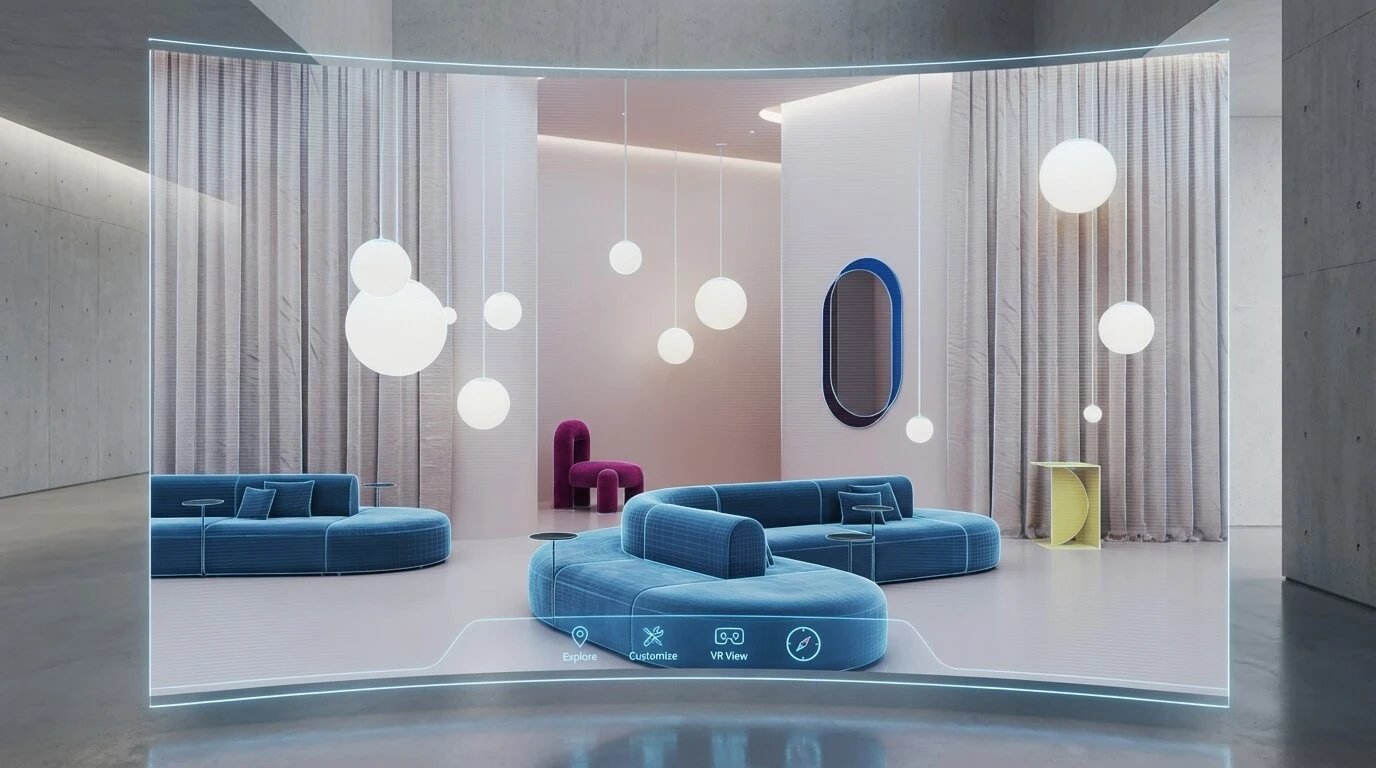
A 3D virtual showroom is a digital exhibition space where visitors explore products in a spatial context. It can consist of linked 360-degree views or a real-time scene with free movement. Product information, configuration, VR and purchasing are optional features, not requirements for a showroom. Spatial design and visual storytelling can shape the brand experience.
Why is a virtual showroom worth it?
| Opportunity | Value and requirements |
|---|---|
| Immersion | Show how a sofa, side table, and light fixture work together. Linked viewpoints convey the spatial composition; free movement requires a suitable 3D scene. Material samples complement the visual assessment. |
| 360° Storytelling | Lighting, architecture and curated scenes communicate a visual identity. Clear navigation helps visitors find their way. |
| Variants and product information | Hotspots can explain details. Configuration and a shopping cart require suitable data and separate technical integration. |
| Global Reach | Prospects can explore a collection before an appointment or revisit it after a trade show. Link to product information and a clear contact option for follow-up advice. |
| Reusing 3D data | Models can provide a basis for imagery or interactive applications. Resolution, materials and data size need adaptation for each use. |

From Technical Term to Visual Experience
We don't just use these technologies; we master them. See how we create photorealistic worlds for leading brands.
View WorkTechnical Fundamentals
- Delivery method: Distinguish panorama tours, browser-rendered 3D and streamed applications. With Unreal Pixel Streaming, a computer or server renders the application and sends an interactive stream. This differs from rendering on the visitor’s device.
- Asset format: glTF/GLB can suit web 3D; USDZ can support particular AR workflows. File format and compression are separate choices.
- Materials: Adjust PBR materials in the target renderer. Check color, roughness, and normal maps on a representative fabric or wood product under the intended lighting.
- Lighting: Choose baked lighting, reflection methods and dynamic effects for the scene. Check visual quality and runtime performance together.
- Measurement: Define useful events, such as product views and contact actions. Account for privacy requirements and consent; missing measurement data does not prove a lack of interest.
Real-World Comparison: Software Stacks for a 3D Virtual Showroom
| # | Platform / Stack | Type & Engine | Possible Applications | Integration | Device checks | Operating requirements | Skills |
|---|---|---|---|---|---|---|---|
| 1 | Unreal Engine | Engine; browser delivery can use Pixel Streaming | Custom real-time scenes and interactions | Develop interfaces and business logic for the project | Test browsers, input, bandwidth and any headsets | Compute capacity, streaming, maintenance and current licensing terms | Real-time development and operations |
| 2 | Unity | Engine with multiple output platforms | Interactive applications built for the project | Connect data sources and external systems separately | Test the actual build on target browsers and devices | Hosting, updates and current terms | Development and asset production |
| 3 | Three.js | JavaScript library for web 3D | Custom interface and interaction within a website | Store or CMS integration requires development | Check browser and device support for each feature | Three.js uses the MIT license. Also plan for hosting, dependencies, and maintenance. | Web and 3D development |
| 4 | Sketchfab Viewer | Hosted, embeddable 3D viewer | Present models and control them through the Viewer API | Assess embedding and additional features | Test the specific viewer and functions | Current offering, embedding rights and data access | Asset preparation; web development for custom features |
| 5 | Matterport | Platform for spatial capture and virtual tours | Explore existing spaces and add information | Check links and available interfaces | Test navigation and display on target devices | Capture, hosting, access and updates | Spatial capture and tour preparation |
| 6 | Threekit | Product visualization and configuration platform | Show variants using defined rules | Coordinate configuration data and business systems | Test the specific display and supported functions | Current offering, integration and ongoing maintenance | Product data, rules and integration |
A panorama tour can suit a curated collection. If visitors need to rotate products or change variants, consider a 3D viewer and suitable configuration logic. With server-side streaming, the complex scene runs on a remote computer; plan for computing capacity and an appropriate connection. Compare approaches using the same products and tasks.
How to Choose the Right Solution
Intended experience
- Define the spatial impression and visual identity first. A panorama tour may be sufficient.
- Add free movement, configuration or in-space advice only when it supports the intended task.
Scope and schedule
- Test a representative section to establish whether the data and interaction work.
- Set a timeline based on content volume, review rounds, development and testing.
Level of Integration
- Product data, configuration rules, the store and CRM need different connections.
- Provide important information as readable web text and links as well. A 3D scene is not automatically search-friendly.
Team Skillset
- Decide who handles web development, 3D data and hosting.
- Updates and support after launch also need clear ownership.
Total effort
- Consider concept development, production, integration, operations and later changes together.
- An inquiry should describe products, use cases, languages and required features.
Workflow: From Concept to Interactive 3D Virtual Showroom
1. define goals & KPIs
- Decide what visitors should understand or do: compare products, read information or contact you.
- Specify the audience and context, such as a sales meeting, trade show or website visit.
- Document scope, responsibilities and success criteria so later requests can be assessed consistently.
2. content audit & 3D asset preparation
- Collect available CAD files, drawings, product photographs, material references and brand guidelines.
- Identify missing variants, materials and product information.
- Depending on the source material, models can also be created from drawings and image references. Surface digitization and geometry capture are different tasks.
- Prepare geometry, textures and UV mapping for the target application; check that reducing data does not alter important product features.
3. look-dev & UX prototype
- Agree on lighting, color, material appearance and spatial design using a representative scene.
- Test navigation, product information and planned interactions in a working prototype.
- Gather feedback from marketing, sales and intended users before producing many variants.
4. engine setup & performance optimization
- Choose panoramas, browser-rendered 3D or a streamed application.
- Measure loading time, responsiveness, data use and image quality on intended devices and connections.
- Review materials and lighting together. A metalness map describes metallic areas; it does not replace a complete material and lighting review.
5. data integration & e-commerce linking
- If required, define responsibilities and interfaces for product data, variants and availability.
- Plan an optional AR product view in the customer’s space with suitable data and device testing.
- Set up only the measurement events you need, accounting for consent and privacy notices.
6. beta testing & QA
- Check browsers, screen sizes, input devices and any VR hardware.
- Give intended users concrete tasks and document confusion or obstacles.
- Check contact options, error messages, and alternatives for slow devices or missing 3D support. A product gallery with technical details keeps essential information available outside the tour.
7. roll-out, marketing assets & maintenance
- Prepare use on the website, in sales and at trade shows; add suitable images or clips.
- Plan updates around actual product and collection changes.
- Agree who maintains content, hosting, technical updates and support.
Our page on 360-degree tours and virtual spaces explains how spatial design and interactive presentation work together. Concept and CGI content are coordinated with the technical implementation required.
Examples of 3D Virtual Showrooms
The three embedded panorama tours show different room and product settings. Start a tour, drag the image to look around, and use the available viewpoints or information hotspots. The tour labels follow your selected site language.
1. Modern Living Experience: space and daylight
A minimalist living space with a warm wood finish, large windows, and a seamless transition to the outdoors. This CGI tour shows how natural materials, natural light, and furnishings blend together to create a digital experience.
2. Serene Sanctuary: a bathroom collection in context
This scene presents a bathroom as a relaxing retreat. Light wood surfaces, white ceramic fixtures, and clear lighting show how the products work together in the space.
3. Contemporary Elegance: a showroom composition
Bold colors, organic forms, and strong contrasts define this virtual tour. Information hotspots add details about individual products to the furniture presentation.
FAQ - 3D Virtual Showroom
What exactly is a 3D virtual showroom?
A virtual showroom is a digital exhibition space that presents products in a spatial context. It may use panoramas or a real-time scene. Free movement, configuration, VR, augmented reality, and checkout are possible additional features, not automatically included.
What are the advantages of this compared to traditional product pages?
A showroom makes spatial context, a collection, and product use easier to understand. A furniture arrangement can show how shapes, colors, and materials work together. The linked product page provides dimensions, variants, and a contact option. Use specific tasks to check whether visitors can find the information they need more easily.
Which technology is right: Unreal, Unity, or a WebGL framework?
First define what visitors should see and do, and on which devices. Panorama tours, browser-rendered 3D and server-side streaming have different strengths and operating costs. A prototype with representative products helps you choose. No engine is the best fit for every project.
Are there already any successful showrooms that we can use as a model?
Yes. Epic’s 2019 Audi and Mackevision case study describes Unreal Engine 4 in automotive retail. Unity’s 2024 Bosch Rexroth case study shows virtual demonstrations of large hydraulic products and their internal components. They illustrate two tasks: presenting variants clearly and explaining complex products. These are external projects, not Danthree portfolio projects.
How do I measure the ROI of such a project?
Define in advance which outcomes you can attribute to the showroom. Compare attributable contribution margin and actual cost savings with the full cost of production, integration, and operations. Also track qualified inquiries and use by your sales team. Product views and time spent help explain the customer journey. Consent, other contact channels, and repeat visits can limit attribution.
What 3D assets do I need, and what should I do if I don't have any CAD data?
Product drawings, dimensions and suitable photographs can provide a basis for modeling. Material samples and visual references help with review. We assess which details and variants can be represented reliably from the information available. Interactive assets then need preparation for the selected system.
Does this work on mobile devices and in VR as well?
It can be designed to do so, but this is not an automatic feature of every tour. Devices, browsers, input and functionality must be compatible. Test real target devices and typical connections, and provide a clear alternative when a feature is unsupported.
How long will the implementation take, and what costs should I expect?
Specify products, spaces, languages, available data, and planned interactions. Budget concept development, CGI production, technical development, and testing as project costs. Hosting, streaming compute capacity where needed, content updates, and maintenance make up ongoing costs. A representative prototype helps estimate data preparation and review rounds, providing a basis for a realistic schedule.
Are the featured tours also product configurators?
The embedded examples show spaces as panorama tours. Product configuration requires variants, valid combination rules, and matching visuals. Ordering additionally needs a store integration with product IDs, prices, and availability. An information hotspot linking to a product page provides a simpler connection to the catalog.