
What is augmented reality?
CGI Visualization to Perfection
Danthree Studio turns complex 3D tech into high-converting marketing assets. Get high-end quality for your brand.
Discuss your projectWhat is augmented reality?
What is augmented reality (AR)?
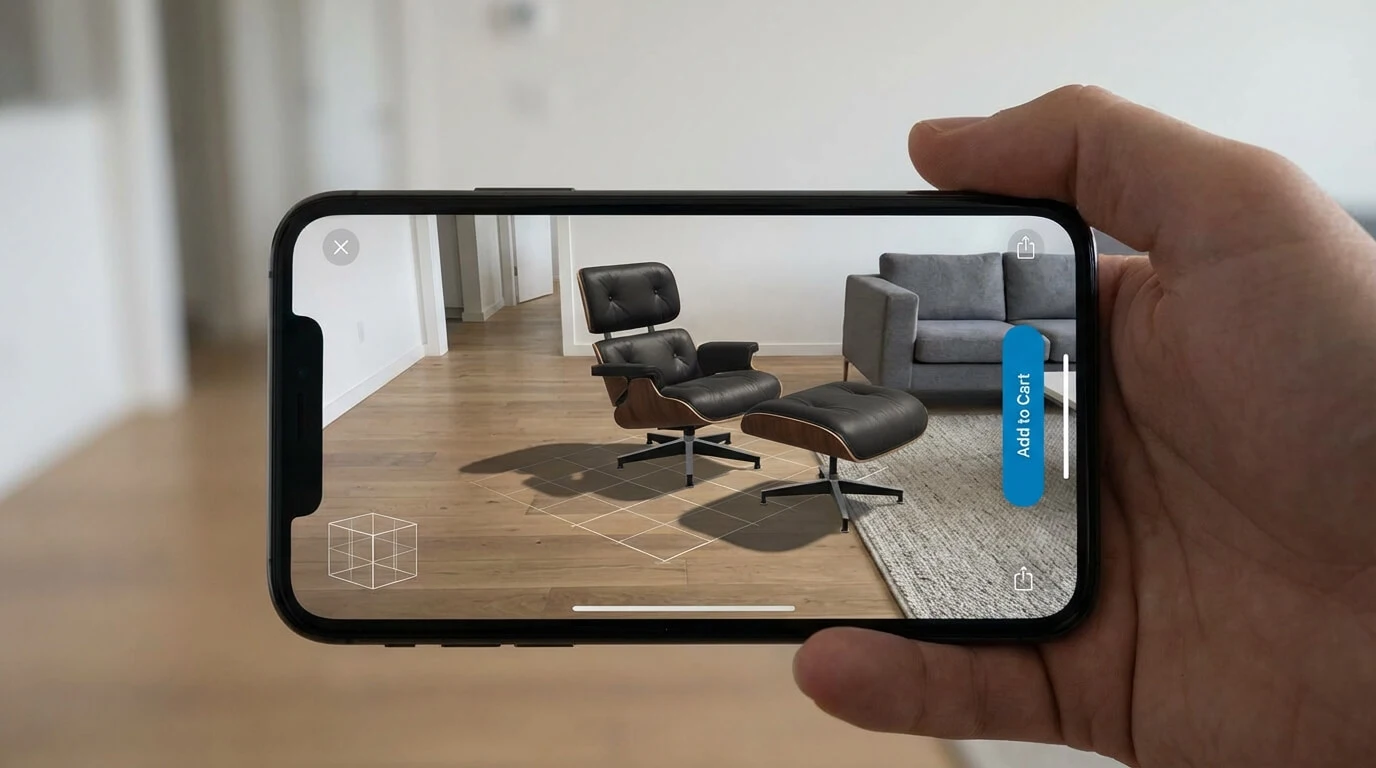
Augmented reality, or AR, adds spatially aligned digital content, such as 3D objects or information, to your real surroundings in real time. Unlike virtual reality, it keeps the physical world visible. For example, you can place a digital piece of furniture in a room and view it from different angles.
How it works: step by step
Step 1: Sensors & tracking
The camera and motion sensors help the device estimate its position and orientation in space. LiDAR or time-of-flight sensors can provide additional depth data, but they are not a general requirement for AR.
Step 2: Spatial Mapping
The software can detect a floor plane and anchor a 3D object to it. Depth maps or room meshes can also enable occlusion and collisions. Available features depend on the device and application.
Step 3: Rendering
A render engine draws the 3D view. Light estimation and suitable shadows can help the object blend visually into the real scene.
Step 4: Interaction
Depending on the application, touch, gestures, or voice let you control position, color, or product variants. A basic AR viewer does not automatically include every configurator feature.
AR example: a digital chair is displayed in a real living space. This helps you assess its visual presence; checking size also requires correct model scale and tracking.

From Technical Term to Visual Experience
We don't just use these technologies; we master them. See how we create photorealistic worlds for leading brands.
View WorkAR vs. VR vs. MR vs. XR: overview
| Term | Do you see the real world? | Do digital objects respond to walls, table edges, and the like? | Real-World Example |
|---|---|---|---|
| AR (Augmented Reality) | Yes, through a camera view or a see-through display | Possible: anchoring, occlusion, and collisions depend on tracking, depth data, and the application | Place a sofa in your living room using a smartphone |
| VR (Virtual Reality) | No, the view shows a virtual environment | The real surroundings are hidden; safety boundaries may be displayed separately | Meta Quest game "Beat Saber" |
| MR (Mixed Reality) | Yes, in an experience that combines physical and digital content | Spatial interaction is central. The application must support the room sensing, shadows, and collision behavior it uses | Apple Vision Pro: a virtual window is positioned in the room |
| XR (Extended Reality) | Collective term for AR, MR, and VR | – | Often used as a general term in tech articles |
Symbol Key
✔ =true / present
✖ =not available
↗ = depends on the device and application
– = not applicable
In brief:
AR adds digital content to your visible real surroundings.
MR often emphasizes spatial integration and interaction. AR and mixed reality overlap; a particular shadow or collision effect does not draw a clear line between them.
VR completely replaces the environment.
XR is simply the umbrella term for all three.
Market and applications
Mobile product viewing: Apple Quick Look supports 3D and AR views of USDZ models on compatible devices. For a furniture store, a key consideration is how easily shoppers can launch the room view from a product page.
Spatial headsets: Apple Vision Pro launched in the US on February 2, 2024. These devices complement smartphone AR with different display and interaction options.
Plan for reach: Google Scene Viewer can launch AR from a website on supported Android devices and offer a 3D view otherwise. Check target devices, load time, and the non-AR fallback instead of using a general market forecast to estimate value.
Benefits for Home & Living brands
Real-Life Preview: Customers can place a sofa, rug, or lamp—to scale—in their own room.
Variant Configurator: An integrated configurator allows you to change fabrics and colors directly on the model, for example, for e-commerce. In our 3D product configurator for furniture, you can compare materials and view the selected variant in your own room on supported devices.
Trade Show Booth 2.0: Fewer physical prototypes, but interactive AR models on a tablet instead.
Content reuse: a shared 3D source model can support AR, an online configurator, and print renders. Each output uses suitably adapted geometry, materials, and textures.
Typical Workflows
- 3D modeling & UV mapping
- PBR material setup (Albedo, Roughness, Metalness, Normal)
- Asset optimization: adapt geometry, texture resolution, materials, and file size to target devices and viewers; test load time and frame rate on real devices.
- Export: for example,
glTF/GLBfor web viewers and Scene Viewer, orUSDZfor Apple Quick Look. Check scale and material appearance in the target viewer. - Integration: a product page with an AR launch option or a custom app, for example using Unity AR Foundation or the target platform’s SDKs. Define controls and available features together.
- Analytics: measure AR launches, interactions, time spent, and conversion, then evaluate them against a suitable comparison group.
Discussion around a table: the clip shows a meeting with a laptop and material samples. References like these can inform material definition; the technical creation of PBR maps is not shown.
FAQs - Augmented Reality
Which devices support AR?
- Apple Vision Pro
- Compatible iPhones and iPads using Apple Quick Look and USDZ; an iPhone 14 Pro is not a general minimum requirement
- Android devices with ARCore/Scene Viewer
- Meta Quest 3 (Passthrough AR)
Do I absolutely need a headset?
No. On compatible smartphones, you can launch AR from a website, for example through Apple Quick Look or Google Scene Viewer. The browser may hand off to a native viewer. A rotatable 3D model alone is not an AR view of your room.
How do I scale high-poly models?
Create an optimized real-time version from the detailed source model: preserve the silhouette, reduce unnecessary geometry, bake surface detail into textures, and adapt materials and texture sizes to the target viewer. Test on the intended devices. Azure Remote Rendering, previously recommended here, was retired on September 30, 2025.
Which authoring tool should I use for materials?
Adobe Substance 3D Painter is useful for creating PBR textures. Its export settings control channel packing, file format, and resolution, among other options. For glTF/GLB or USDZ, the model, textures, and supported materials must work together; arbitrary shaders do not automatically transfer unchanged.
Which engine is state-of-the-art?
The target platform determines the choice. Unity AR Foundation brings together AR features across platforms; Unreal Engine also provides XR tools. Lumen is not a universal mobile AR standard: Epic documents experimental support on selected high-end Android devices, not iOS/iPadOS. An offline path tracer does not replace a real-time AR renderer.
What does XR stand for?
XR stands for extended reality, an umbrella term for AR, MR, and VR.
Which file formats work most reliably in browsers today?
glTF/GLB is widely used for 3D display on the web and in Google Scene Viewer. USDZ is used by Apple Quick Look on compatible Apple devices. A store often benefits from both outputs. AR availability depends on the device, browser, and viewer; also test the regular 3D view as a fallback.
Does AR demonstrably increase revenue?
There are positive case studies: Shopify reports that Gunner Kennels saw a 40% increase in order conversion compared with the previous quarter and a 5% reduction in return rate after introducing 3D/AR. This is one company’s reported result, not an industry average or proof of AR’s isolated effect. For your store, use a controlled comparison and examine AR usage, orders, and reasons for returns together.